FAQ - DJI Avata 360 - Answers to Frequently Asked Questions

What sets the drone apart DJI Avata 360?
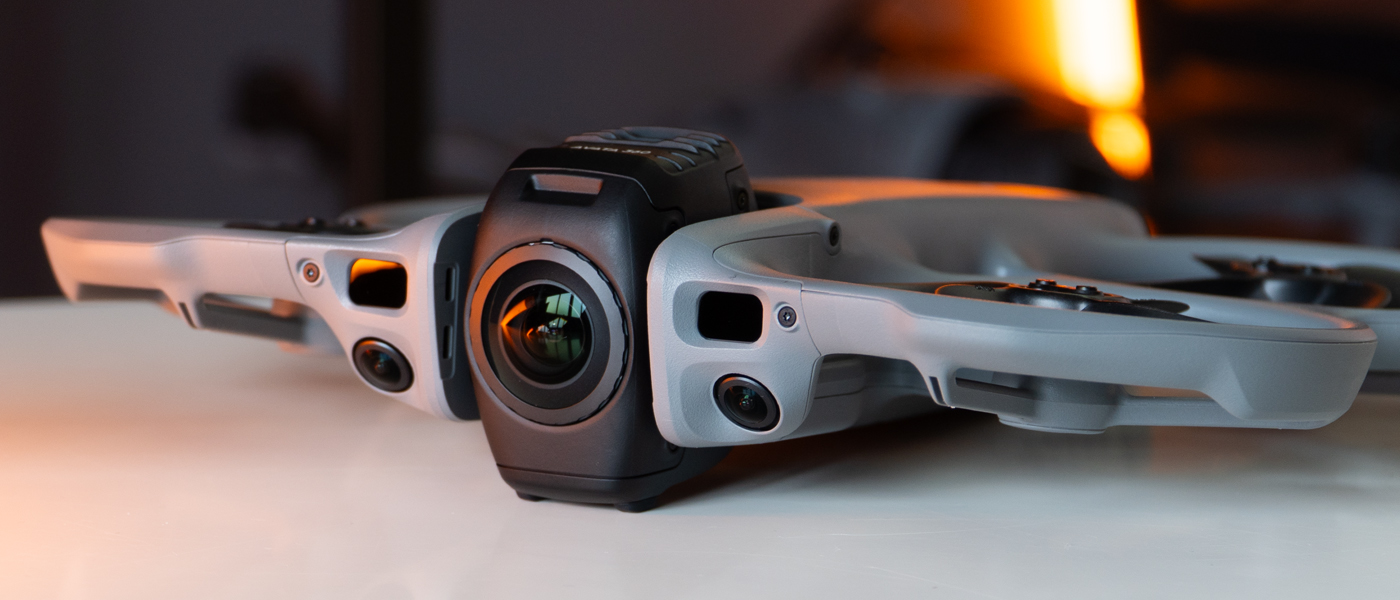
DJI Avata 360 is the first drone DJI with a 360° camera [1].It provides an exciting, immersive flight experience while enabling creative 360° filming, helping you capture spectacular shots with ease.
- Flagship imaging system equivalent to 1-inch sensor [2], 8K/60FPS HDR video [3]: the drone DJI Avata 360 is equipped with two next-generation 1/1.1-inch square CMOS sensors.This design provides a panoramic viewing range equivalent to a 1-inch matrix.
- Video transmission system DJI O4+: allows video transmission over very long distances - up to 10 km [4].
- Multidirectional obstacle detection [5], integrated propeller guard: with its forward-facing LiDAR sensor, the Avata 360 offers multidirectional obstacle detection even at night [5] in 360° mode.Integrated propeller guard provides an extra level of safety.
- Infinite creative possibilities in one shot [3]: capture a full 360° image in one flight.In post-production, you can change perspective and create many different shots from a single recording.
- Spotlight Free [3] - instant shots ready to share: the Spotlight Free [3] feature tracks a moving subject and supports camera movement.Just fly to easily get striking shots - even without editing.
- DJI Avata 360 supports a virtual 360° gimbal, which allows you to go beyond the physical limitations of classic solutions and realize dynamic camera movements.You can also use a camera with a built-in screen for precise camera control, or experience immersive flight by tracking your head movements with goggles and a corresponding controller.One device combines FPV flight and aerial filming.
- 360° and Single Lens modes - two flexible modes [5]: switch seamlessly between 360° and Single Lens modes to record classic Avata-style shots in 4K/60FPS quality.
1.Status as of March 2026.
2.Only available in 360° mode.When recording 360° footage, each of the two CMOS sensors in DJI Avata 360 offers an imaging area equivalent to a 1-inch CMOS sensor with a 4:3 aspect ratio.
3.Only available in 360° mode.
4.According to CE standard.Measured in an open outdoor environment without interference.A transmission range of up to 20 km is only achievable with the FCC standard.Data shows maximum communication range for one-way flights without return.Always pay attention to the app's in-flight messages.
5.Omni-directional obstacle detection works only on surfaces with clear texture, with at least 1 lux illumination and is only available in 360° mode.In Single Lens mode, only front obstacle detection is supported.
Which controllers and goggles are compatible with DJI Avata 360?
- Standard controller: DJI RC 2, DJI RC-N2, DJI RC-N3
- Motion controller (requires pairing with DJI Goggles 3 or DJI Goggles N3): DJI RC Motion 3
- FPV controller (requires pairing with DJI Goggles 3 or DJI Goggles N3): DJI FPV Remote Controller 3
- Goggles (requires pairing with DJI RC Motion 3 or DJI FPV Remote Controller 3): DJI Goggles 3, DJI Goggles N3
How DJI Avata 360's features differ based on control and recording mode?
The availability of functions depends on the control method and the selected recording mode.
360° mode:
HDR 8K/60FPS video recording, FocusTrack, 360° virtual gimbal, omni-directional obstacle detection and other features specific to 360° shot work are only available in this mode.
Some smart features vary depending on the control method:
- Available only when using goggles paired with a motion controller: features such as aerial stunts and Head Tracking.
- Available only with a standard controller: features such as QuickShots and ActiveTrack 360° in FocusTrack.
Single Lens Mode:
Supports video recording only, with a maximum resolution of 4K/60FPS.In this mode:
- Using the goggles and motion controller, you can fly and record in First-Person View (FPV) with better flat video quality.
- With a standard controller, too, you can fly and record in First-Person View (FPV).The image tilts with the tilt of the drone, giving the recordings a dynamic, distinctive FPV style.
What is the DJI Avata 360's maximum wind resistance and maximum takeoff altitude?
The maximum wind resistance is 10.7 m/s (level 5), and the maximum takeoff altitude is 4,500 meters.
Is the drone DJI Avata 360 waterproof?
Not.Avoid contact with water during use, as it may damage the device.
If it starts to rain while flying, return and land as soon as possible, and wait until the drone is completely dry inside and out before using it again.
What are the advantages of native 8K 360° video at DJI Avata 360?
DJI Avata 360 uses two redesigned square CMOS sensors with optimized pixel layout: the number of vertical pixels has been increased to 4,000 (compared to 3,000 in traditional rectangular sensors).This enables native 360° video recording in 8K (4K+4K) quality using two lenses.Large 2.4 μm pixels provide greater light sensitivity, and dynamic range reaches up to 13.5 degrees.Combined with the f/1.9 aperture, this produces high-quality images with a wide dynamic range and very good recording quality in low-light or high-contrast scenes.
How to protect your drone's lens DJI Avata 360?
The surfaces of both fisheye lenses have been coated with multilayer coatings and subjected to a hardening process to ensure high image quality.
However, lenses are very precise and delicate components, so we recommend handling them with care and proper protection.
When storing the drone, make sure the gimbal is locked and has a cover on to prevent keys, sand or other hard objects from scratching the lens.
Before putting on the cover, check that there are no foreign bodies inside that could scratch the surface of the lens.
If the front optical element is scratched, you can buy a new lens in a tool kit and replace it yourself.
Can the front components of the drone be replaced DJI Avata 360?
The front components of the drone are distinguished by a design that allows them to be replaced.Just buy a new lens in the tool kit and follow the instructional video to replace it.
Does DJI Avata 360 support ND filters?
No, DJI Avata 360 does not support ND filters.
Does DJI Avata 360 support handheld recording?
No, it is not possible to use modes such as hand-held recording.
Does DJI Avata 360 support Pro mode for photos and video?
Yes, DJI Avata 360 supports Pro mode for photos and video.
What resolution settings does DJI Avata 360 support?
360° mode:
- 8K (2:1): 7680 × 3840@60/50/48/30/25/24FPS
- 6K (2:1): 6000 × 3000@60/50/48/30/25/24FPS
Single Lens Mode:
- Single Lens 4K (4:3): 3840 × 2880@60/50/48/30/25/24FPS*
- Single Lens 4K (16:9): 3840 × 2160@60/50/48/30/25/24FPS
- Single Lens 2.7K (4:3): 2688 × 2016@120/100/60/50/48/30/25/24FPS*
- Single Lens 2.7K (16:9): 2688 × 1512@120/100/60/50/48/30/25/24FPS
* Supported only with DJI Goggles 3/N3 paired with DJI RC Motion 3 or DJI FPV Remote Controller 3.
What video formats does DJI Avata 360 support?
OSV for 360° videos and MP4 (HEVC) for standard videos.
What is D-Log M color mode in DJI Avata 360?
D-Log M is a color mode that provides greater flexibility when color correcting in post-production.By brightening shadow areas and suppressing bright parts, it preserves more image detail.Recordings in D-Log M have less saturation and contrast, but contain more color and brightness information, making it easier to create different video styles during processing.
Does DJI Avata 360 use fixed-focus lenses?
Yes, DJI Avata 360 uses two fixed fisheye lenses.
Does DJI Avata 360 allow you to record HDR video?
Videos recorded with DJI Avata 360 have a high dynamic range, so an additional HDR mode is not necessary.
How to edit RAW 360° photos taken with DJI Avata 360?
You can use professional third-party software for processing, and DJI Studio will support RAW 360° photo editing in the future.
How to edit videos recorded with DJI Avata 360?
Use DJI Fly on mobile devices and DJI Studio on computers.
How to edit videos recorded with DJI Avata 360 using software on your computer?
Read instructional materials on DJI Avata 360.
How to transfer files from DJI Avata 360 to your smartphone or computer?
Smartphone connection: you can use QuickTransfer function to transfer recordings to your phone.
Computer connection: files can be transferred when the drone is connected to a computer via a data cable - without having to turn on the device.
Why when I pair the drone DJI Avata 360 with the control camera from the kit, the message "Connected device not bound to aircraft" appears when I connect another controller or goggles?
Drone must be paired in one-to-one mode with the controller or goggles in use.
To use a different controller or goggles, you will need to go through the pairing process again - otherwise a maximum of 20 flights will be possible with the new device.
Does DJI Avata 360 support Manual mode (M-mode)?
No, it is not possible to fly DJI Avata 360 in acro, manual.
Does DJI Avata 360 support obstacle detection?
DJI Avata 360 supports omni-directional obstacle detection*.
Obstacle detection on the left, right and rear uses fisheye cameras, so this feature is only available in 360° mode.
In Single Lens mode, only front obstacle detection is supported.
* Omni-directional obstacle detection works only on surfaces with clear texture and with at least 1 lux illumination.For details, refer to the product sheet on the official website DJI or to the user manual.
What are the options for charging the drone DJI Avata 360?How long does it take to fully charge?
There are two ways to charge: parallel charging via a two-way hub* or direct charging of the drone.
- Charging via bidirectional charging hub (max.100W charging power): with the DJI 100W USB-C Power Adapter, the hub charges three batteries simultaneously*, which takes approx.100 minutes** (from 0% to 100%) or approx.70 minutes** (from 10% to 90%).Charging one battery takes about.47 minutes** (from 0% to 100%) or approx.31 minutes** (from 10% to 90%).
- Direct charging of the drone (max.charging power of 65 watts): with the DJI 65W Portable Charger it takes approx.73 minutes**, and from 10% to 90% - approx.51 minutes**.
* Parallel charging requires DJI 65W Portable Charger or DJI 100W USB-C Power Adapter.With an input power of 65 watts or more, the hub supports parallel charging.Otherwise, it charges the batteries sequentially, starting with the one with the highest charge level.
** Charging time was measured in a test environment, at 25°C.Actual charging time may increase at higher ambient temperatures or depending on the grid voltage in your region.
What are the features of the two-way charging hub for DJI Avata 360?
- Charging: bidirectional hub supports PD standard fast charging and can power up to three batteries simultaneously.
- Storage: the hub allows three batteries to be stored simultaneously for easy transport and use.
- Power accumulation: after inserting two or more batteries, you can hold down the function button to start the process of transferring power from the battery with a lower charge level to the one with a higher charge level.This allows you to accumulate the remaining power and extend the flight time.
Which chargers DJI are recommended for DJI Avata 360?
When charging with the two-way hub, it is recommended to use the DJI 100W USB-C Power Adapter.
When charging the drone directly, it is recommended to use the DJI 65W Portable Charger or the DJI 100W USB-C Power Adapter.
Can you charge your drone via USB-C port?
Yes.It is recommended to use DJI 65W Portable Charger or other USB Power Delivery chargers for faster charging.
How often should propellers be replaced and how to do it?
- Check that the propeller screws are tightened after every 30 hours of flight (approx.60 flights).
- Instructions for installation and replacement of propellers:
- Mount marked propellers on marked engines, and mount unmarked propellers on unmarked ones.Use the screws included in the package with the propellers and tighten them carefully.Use only the screwdriver included in the kit for installation - using another may damage the screws.
- If the propeller is damaged, dismantle it along with the screws from the corresponding motor, and then discard it.
- Use only original propellers DJI and DO NOT MIX different propeller types.
Does the maximum transmission range of the O4+ system depend on the level of interference in the environment?
In different environments, the level of wireless interference is different, so the maximum transmission range may vary.
Unhindered:
- Strong interference: urban area, approx.1.5-4 km
- Medium interference: suburban area, approx.4-10 km
- Low interference: suburbs/coast, approx.10-20 km
With obstacles:
- Low interference and building obstructions: ok.0-0.7 km
- Low interference and tree obstructions: ok.0.7-4.5 km
Data tested to FCC standard in environments with typical interference, with or without obstructions.The above information is a reference only and does not guarantee actual transmission coverage.
How to share live video from DJI Avata 360 while in flight?Are there restrictions on the number of devices?
When using the goggles, there are three ways to share live video:
- Wireless sharing via Wi-Fi*: you can enable screen sharing from DJI Goggles 3 to your smartphone via Wi-Fi in the Goggles menu.The mobile device connects to DJI Goggles 3 via Wi-Fi, and the DJI Fly app displays live video from the drone.Wireless sharing supports connection to only one mobile device.
- Wired sharing: a mobile device can be connected to DJI Goggles 3/N3 using a data cable and OTG adapter.Then the DJI Fly app on the connected device will display live video from the drone.This method also supports only one mobile device.
- Audience mode: enable the broadcast function in the DJI Goggles 3/N3 menu to allow other DJI Goggles 3/N3 to join the broadcast channel and receive live video.The number of goggles in Audience mode is not limited.
Note: only one type of connection is supported at a time - goggles or mobile device.
* In some countries and regions, the use of the 5.1/5.8 GHz frequency bands (or one of them) is prohibited.In selected countries, the 5.1 GHz band can only be used indoors.If 5.1/5.8 GHz bands are not available (e.g., in Japan), Wi-Fi screen sharing to the phone will not be possible - in such situations, a wired connection is recommended.Always check local regulations and strictly follow them.
When using a standard controller, you can select a live streaming platform in the preview menu of the DJI Fly app and share the video online.