
How to check the number of charges and the condition of the battery DJI?

The battery is one of the most important and also the most exploited components of any drone DJI. It is its condition that determines not only the flight time, but most importantly the safety and stability of the operation. Whether you fly recreationally, create commercial content, or perform industrial inspections, conscious monitoring of battery health is an absolute must.
In this guide, we describe how to easily check the number of charging cycles, how to interpret voltage differences between targets, and when to realistically start considering battery replacement. This will help you avoid unpleasant surprises, such as a sudden drop in power on the fly or the message "Battery Error".
Where to check the number of battery charges DJI?
For most drones DJI (e.g., Mavic, Air, Mini, Phantom or Inspire), the number of charging cycles is available directly in the app DJI:
In the app DJI Fly (for new models, e.g. DJI Mini 4k, DJI Mini 4 Pro, DJI Air 3S):
Connect the controller to the phone (or turn on the controller for those with a built-in display), turn on the DJI Fly app and launch the drone, then:
Stage 1 - enter the menu, which is the three dots on the upper right side of the screen:

Step 2 - in the first tab "Safety" - scroll down to the item "Battery information":
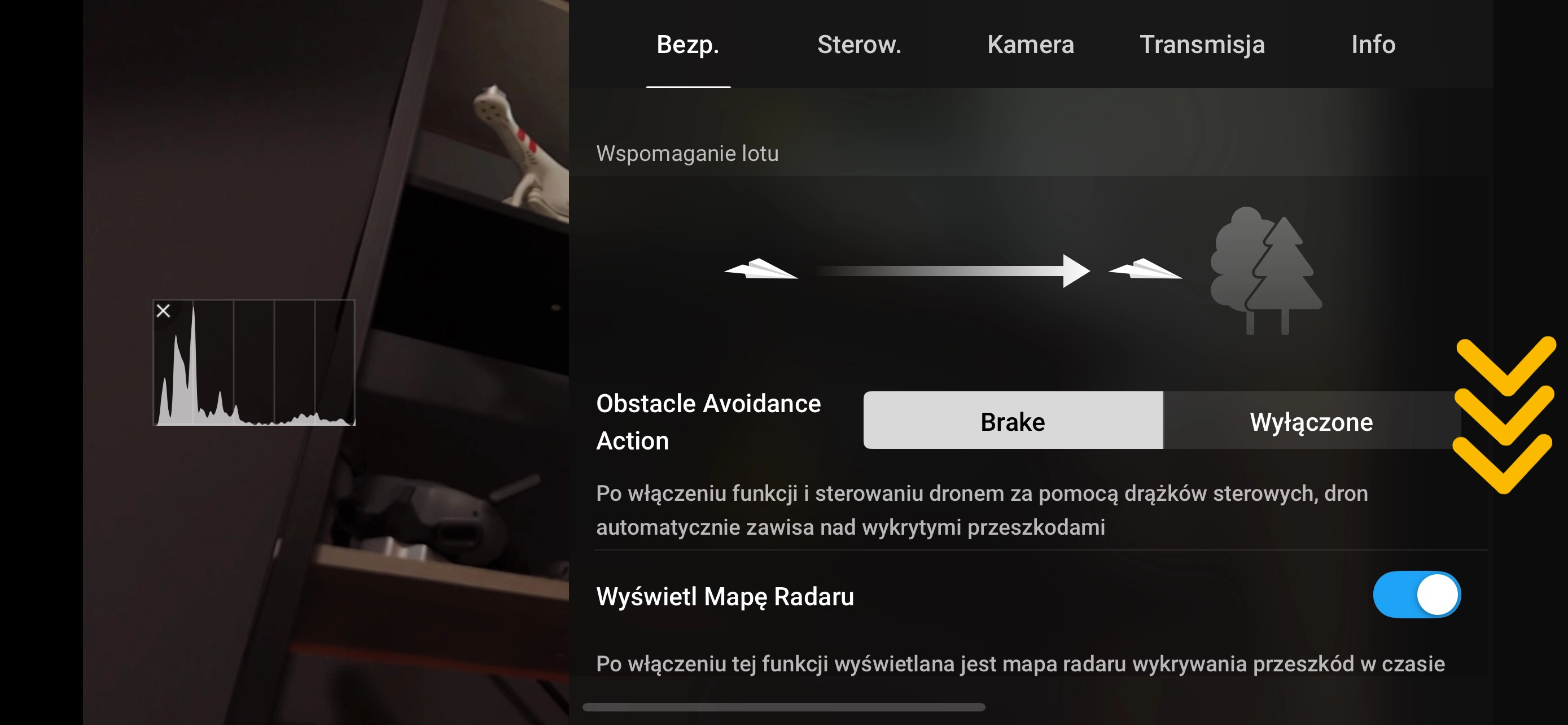
Step 3 - select "Battery information":

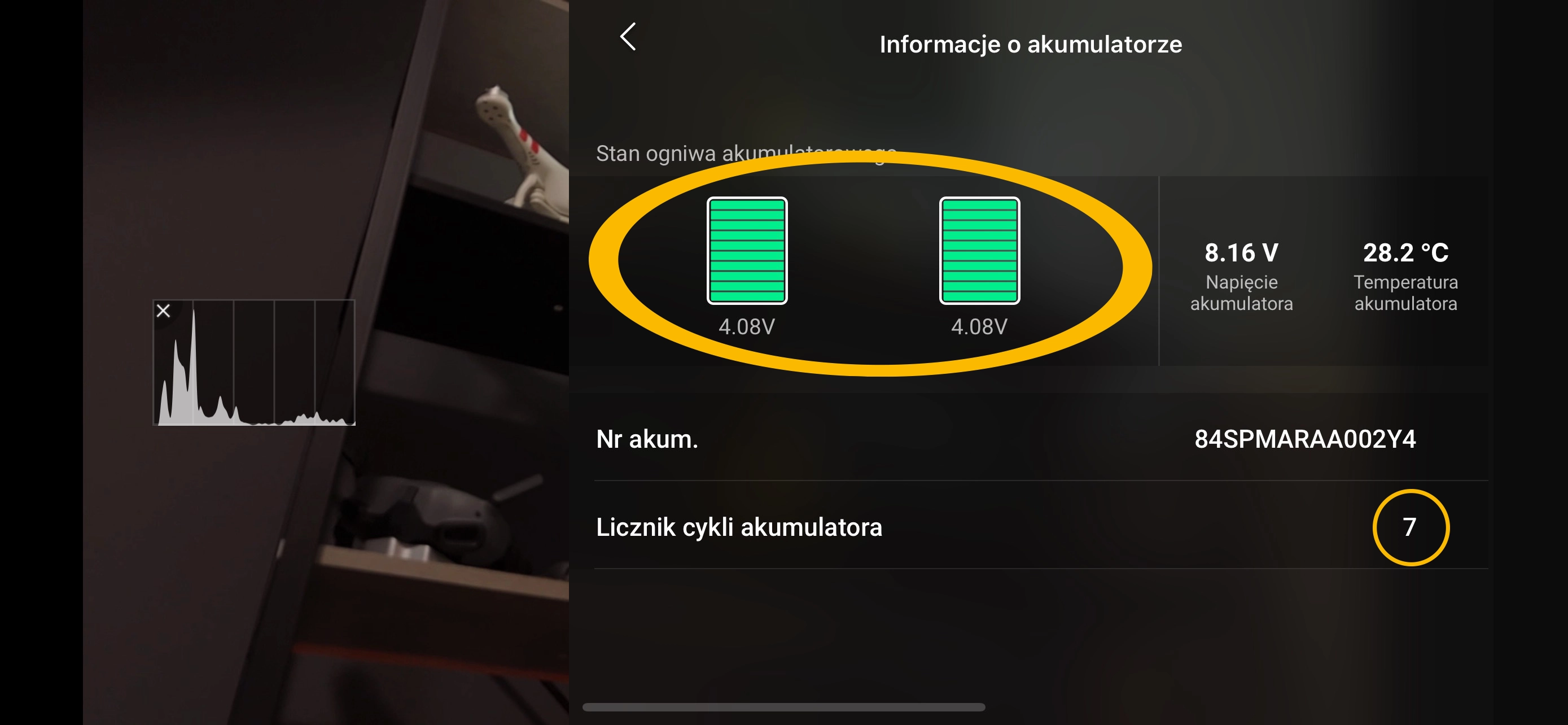
Step 4 - read the battery charge cycle counter and be sure to check the condition of the cells:
What the number of cycles means?
One cycle is a full 100% charge (e.g. one charge from 0 to 100%, or twice from 50% to 100%). DJI assumes that the battery maintains optimal performance for about 200 to 500 cycles, depending on the model. After this time, it is a good idea to check its parameters more often.
Differences in tension between targets - what they mean?
Each battery DJI is a LiPo battery, consisting of several interconnected cells (called cells). Ideally, the voltages of all targets are equal or very close to each other.
If a larger difference (called delta) appears between the two, it is a signal that the battery may be worn out or damaged. Example thresholds:
| Voltage difference | Which means? | Action |
| < 0.03 V | Perfect condition | All normal |
| 0.03 - 0.05 V | Moderate difference | Watch, but you can fly |
| 0.05 - 0.10 V | Deteriorating balance | Avoid long flights, consider replacing soon |
| > 0.10 V | Volatility risk | Don't fly, battery can be dangerous |
Such information can be found, for example, in the application DJI GO 4, DJI Assistant 2 or by using external tools for reading logs (such as Airdata).
When to replace the battery DJI? Signs of wear and tear
There is no single "magic" moment when you need to replace the battery, but there are symptoms that are not worth ignoring:
noticeable voltage drops during flight,
frequent messages like "Battery Error" or "Voltage Deviation."
battery swelling or visible damage,
slower charging or not reaching 100%,
voltage difference between targets more than 0.10 V.
If you observe more than one of the above symptoms, it's a sign that it's a good idea to plan a replacement - before something unforeseen happens in the air.
How to take care of your battery DJI, to make it last longer?
Battery life largely depends on how you use it. Here are some practical rules:
Don't unload to zero - best to end the flight at 20-25%.
Avoid overheating - both during flight and charging.
Don't store a fully charged battery for a long time - DJI automatically discharges it to a storage level (~60%).
Use original chargers and avoid cheap replacements.
Don't fly on a damaged or overbalanced battery.
A well-maintained battery not only means a longer life, but also greater peace of mind during every flight.
Summary
The battery is the component on which the safety of your drone - and your wallet - depends. Regularly checking the number of charge cycles, monitoring voltage differences between targets, and being aware of signs of wear and tear can help you avoid costly failures and extend the life of your equipment.
Remember - it's better to replace the battery too early than to lose your drone by reacting too late.
If you are not sure if your battery is still flyable - contact our Megadron service center. We will check it for you and advise you if it is time to replace it.